Claude's artifact apps are not PWAs
By Mert Düzgün
Many people, me included, thought these were PWAs.
They are not.
A PWA is a website that your browser saves as an app. A Claude artifact app is a tiny launcher. It opens your artifact inside the Claude desktop app, live from claude.ai.

You can now install Claude artifacts as desktop apps on Mac and Windows.
Ask Claude to build an artifact, click "Install as app", and open it like any other app. It can use your connectors and, if you allow it, send notifications or add a menu bar item.
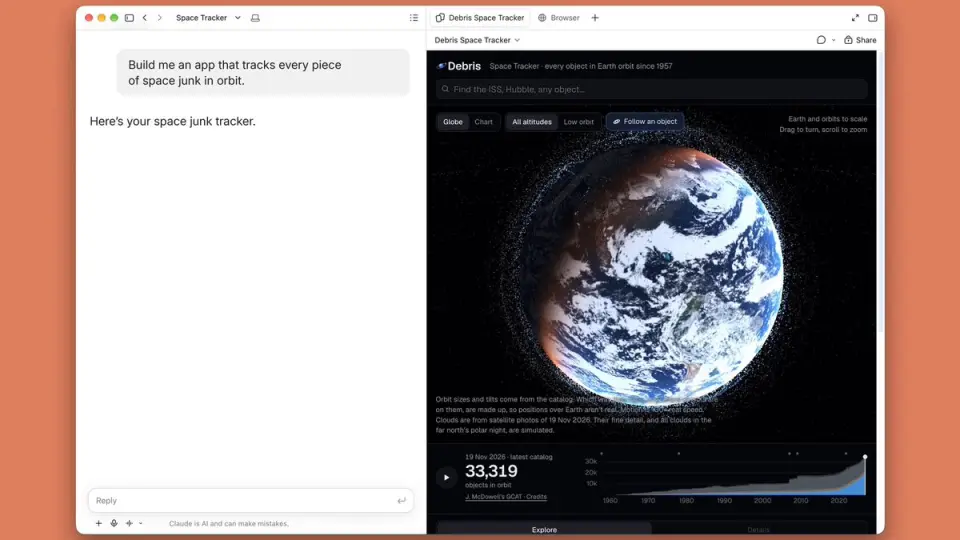
The app is a launcher, and Claude does the work
The icon in your Dock is only a launcher. Claude does the real work in the background, without a Dock icon of its own, so you only see your app.
The window loads the artifact from claude.ai each time, in the session you are signed in with.
It acts like a real app, but always loads live
-
A real app in a folder
On a Mac it goes in
~/Applications/Claude Apps, so Spotlight and the Dock find it. On Windows you get a Start menu entry and a desktop shortcut. -
No web code inside
The app holds a launcher, a small notification helper, an icon and two info files. Nothing from your artifact is stored in it.
-
Always the live version
When you or another editor change the artifact, the app changes too. To open it you need to be online and signed in to Claude.
-
Your connectors come along
The app can use Claude and your connectors the same way the artifact does.
-
Notifications and a menu bar item
Notifications show the app's own name and icon. Claude draws the menu bar item (a tray icon on Windows), and it keeps the app running after you close the window.
-
It asks first, and again after updates
Notifications, keyboard shortcuts, floating over other windows, the menu bar item and full access to your computer each need your yes. After any update, even your own edit, it asks again.
A PWA runs in your browser, this runs in Claude
| PWA | Artifact app | |
|---|---|---|
| What you install | A website, saved by your browser | A tiny launcher |
| Runs inside | Your browser | The Claude desktop app |
| Works offline | If the site allows it | No, it loads live |
| Menu bar item | No | Yes, if you allow it |
| Claude and your connectors | No | Yes |
| Full access to your computer | No | Yes, if you allow it |
Your browser's "Add to Dock" and "Add to Home Screen" only add a shortcut. They do not get these features.
Sources
- Install an artifact as an appsupport.claude.com
- The announcementx.com
What is inside the app on a Mac comes from reading the files of Claude desktop 6.28899.6. Windows details come from the help page.